case study · design + build
I'm a designer, not a developer. This site and the app I run my working day on are where I find out how much that still limits what I can put in front of people. Every design decision here is mine; the implementation was written with AI, in small batches, and checked by measuring the result.
- 100/100Google PageSpeed Insights
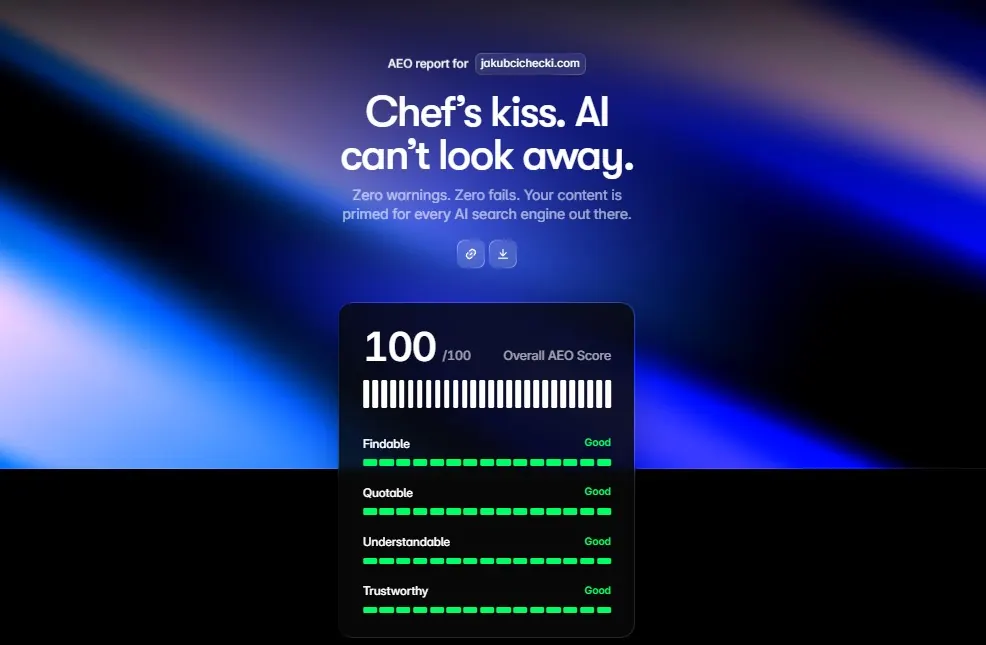
- 100/100AEO Framer score
- 3npm dependencies
- 77%lighter than the old WordPress homepage
- Role
- Design, art direction, build
- Timeframe
- Jul 2026–ongoing
- Stack
- Claude Code · Astro · Tailwind · vanilla JS
why rebuild
The old site was WordPress, years out of date, and sold me as an illustrator. That work still matters to me, but it stopped being what I do most days, and a portfolio that opens with it makes the wrong argument in the first three seconds.
The rebuild had a second job. I now do a lot of my work with AI in the loop, including building things I could not have built alone. Saying that in a paragraph is cheap.
If I'm going to claim I ship this way, the site itself has to be the evidence.
what it's built from
The whole site is plain files on ordinary shared hosting. Nothing runs on the server; everything is compiled on my machine and uploaded exactly as it will be served.
- Claude Code
- Every line here was written by prompting it, section by section, and checked by measuring the result rather than by trusting it. The design decisions stayed mine; the typing did not.
- Astro 7
- Static output. Ships no JavaScript unless a component asks for it, which is what keeps the page weight where it is.
- Tailwind 4
- Used mainly to define the design system — colours, spacing, fonts — rather than to style each element by hand. Keeps the whole site's look consistent and easy to change in one place.
- Vanilla JS
- No framework, no animation library — just small, hand-written code for each interaction. Kept deliberately light so the page stays fast to load.
- Self-hosted fonts
- Neue Machina Inktrap for display, Satoshi for body. Three faces in total, subset to woff2.
- No CMS, no database
- Case studies are data objects in the page file. Copy is edited in place on the page in dev mode, so a wording change never means an admin panel or a database.
the design system underneath
- Colour
- A five-step grey ramp on #efefef, ink at #414141 rather than black. One saturated colour in the whole system: #1bc40f.
- Type
- Neue Machina Medium for display and UI, Satoshi for reading. Sizes are clamp() pairs, so nothing needs a breakpoint to stay proportional.
- Radius
- 60–80px on pills, 18–24px on cards, 64px on the hero mockup. Softness scales with the size of the surface.
- Rhythm
- Page gutter clamps 24px to 128px. Every padding, margin and grid gap on the site lands on one scale: 24, 32, 48, 64, 96, 128.
how the AI part actually works
I don't write the code. I designed initial screens, then prompted section after section to make it work as intended. There was no generic "design me a website" prompt, so I avoided typical AI clichés and got the look and feel that was in my head from the start.
Kokpit — a personal task & time tracking app
I also built an app for my freelance work: tasks, time-tracking and billing automated in one place. Kokpit replaced the two tools I used to pay for, Nozbe for tasks and Toggl for time.
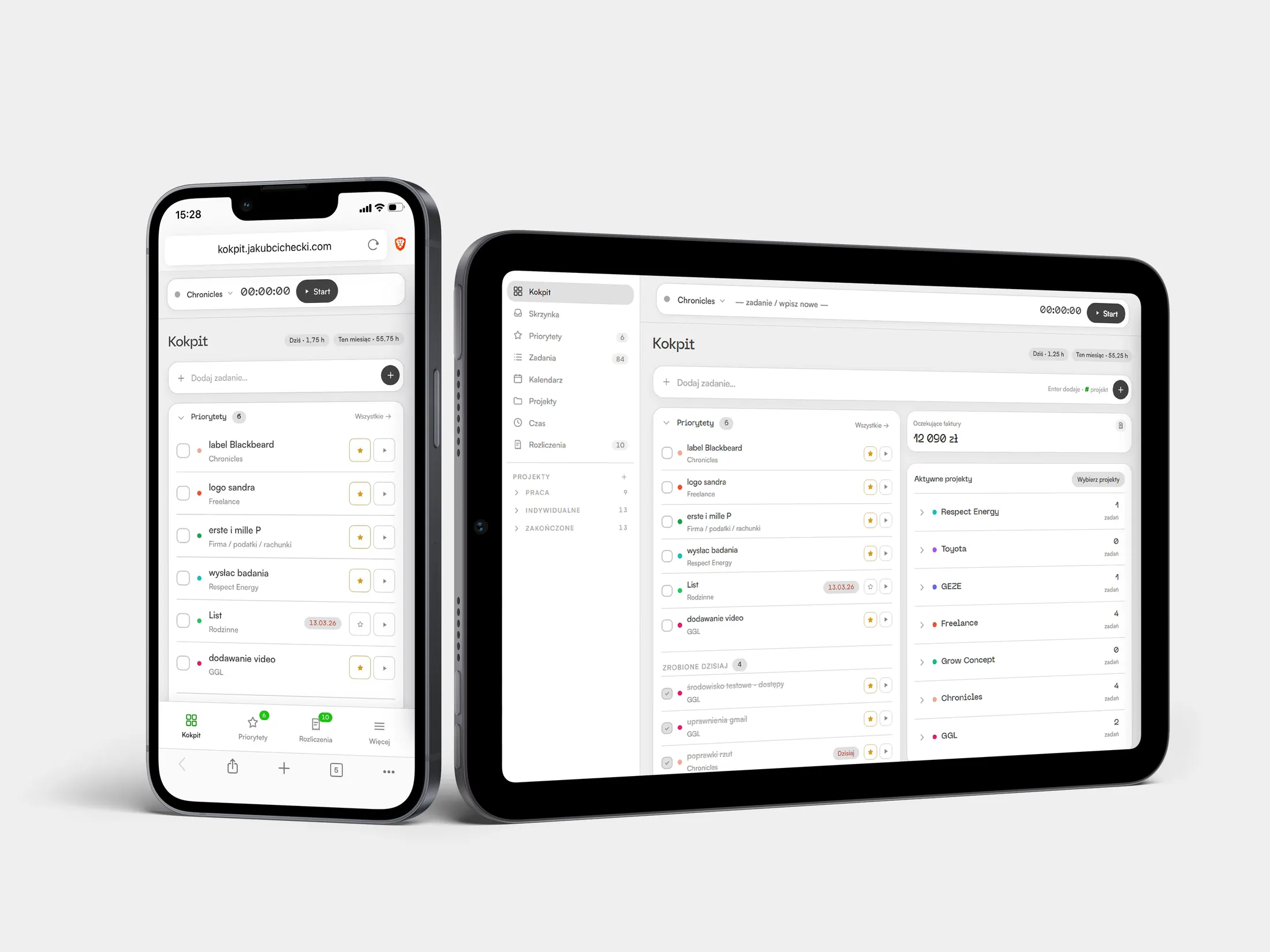
It runs on the same shared PHP hosting as this site, with a static front end, a PHP API and a MySQL database.
I built it because the tools I paid subscription for never fully fit the shape of my work. Toggl had no idea which Nozbe task a timer belonged to, so every entry had to be matched up by hand, and at the end of a month I added the hours up and typed them into the billing document myself. I did build a small app to generate those reports, which is when it became clear I was automating the wrong half: the timer and the task list had to be one app.
changelogs
this site
- v1.1
Tag popups on the hero
- Tag popups Clarity's heatmaps showed the hero tags getting clicked a lot, but a click did nothing beyond the hover animation — so it now opens a bubble with a line about that side of the work and a link to the case study behind it.
- v1.0
Live on the main domain
- Published The site replaced the WordPress install that had been on jakubcichecki.com for years.
- Hero A showreel replaced the still mockup.
- Analytics Cloudflare Web Analytics and Microsoft Clarity, both running without cookies, so there is no consent banner to put in front of the page.
- Answer engines An AEO audit scored 94. Two fixes took it to 100: image alt coverage, and outbound links.
- v0.6
Editing in place, and a few interactions
- Editable copy Any paragraph or caption can be edited straight on the page in dev mode — select text, format it, and it saves on its own. No more editing source code for a copy change.
- Lightbox Click any photo to view it full-size, with arrow keys, dots and wraparound between images.
- Video Uploaded video is compressed automatically now, the same way images already were.
- Intro The opening animation times itself to how fast assets actually load, instead of a fixed delay.
- v0.5
Two audits
- Speed Stylesheet inlined, so no request stands between the document and the first paint. Client logos compressed about 40%.
- Access Tile headings stopped skipping a level. PageSpeed accessibility 93 to 100.
- Rhythm Every padding, margin and gap of 24px or more lands on one scale, 61 declarations of them. Type left alone: it does not run on a spacing scale.
- Answer engines JSON-LD built from the same props as the meta tags, so the two cannot drift apart, plus llms.txt and a robots.txt that names the AI crawlers instead of leaving them to infer.
- v0.4
The rest of the work
- Pages Two projects added.
- Images Build script compresses dropped files to webp and reports the slots still empty.
- v0.3
Case studies and the transition
- Case studies Two pages built on one shared layout.
- Page transition A directional slide carried across the navigation, replacing a tile zoom.
- Contents rail Sticky index on the long pages. Scroll position decides which section is marked, not an observer.
- v0.2
Weight and access
- Weight Artwork pre-cropped before compressing rather than after, and the fonts cut to the faces actually in use.
- Entrances Every element that starts hidden got a timed failsafe. In a tab that isn't painting frames, observers never report and transitions never advance, so the headline stays invisible.
- Access Focus-visible on everything interactive, and a static fallback wherever reduced motion is asked for.
- v0.1
Foundation
- Design system Colour and type declared once, as custom properties in a single Tailwind theme block.
- Stack Astro and Tailwind, static export. The host runs PHP and nothing else.
Kokpit
- v1.4
Quotes for clients
- Offers A client brief becomes a draft quote — project texts, a costed estimate in a few pricing variants, and terms — pasted straight into Kokpit as one block or saved directly to Notion.
- v1.3
On the home screen
- iPhone widget Prioritiy tasks on the home screen, through Scriptable. It reads the existing API and adds nothing to the backend. The order matches the app.
- Privacy Project blocks in billing collapse to a name, hiding the amount and the hourly rate, so the app can be shown to somebody without showing what it charges.
- Billing Item names and amounts are editable in place. An amount cleared or set to zero reverts rather than dropping the item out of the list.
- Groups The work/personal split moved from per-device storage onto the server, so it stops disagreeing between phone and desktop.
- Fixes The timer's task field came back on phones. The menu behind the hamburger stopped repeating the bar it sits under. Adding a client stopped failing: the country field was a placeholder rather than a value, so the form sent an empty one into a column that forbids it.
- v1.2
Off the laptop, and off Toggl
- Offline Installable PWA. Time entries, amounts, task ticks and new tasks queue locally and sync when the network returns.
- Mobile Small-screen layout: three views in a bottom bar, the rest behind a menu.
- Toggl migration Duplicated and orphaned entries cleared, so monthly hours stopped double-counting. Toggl dropped.
- v1.1
Invoices
- Calculator Rebuilt from the spreadsheet and checked against past invoices. A threshold leaves a band of payouts unreachable, and the app reports that rather than substituting a nearby figure.
- Document Print-ready page with the typeface and signature embedded in the file. The PDF comes from the browser's own print.
- Clients Client details are copied onto the invoice at issue, so editing an address cannot rewrite a document already sent.
- v1.0
Running on its own
- Email to task Anything sent to a dedicated address becomes a task in the right project.
- Calendar Tasks with deadlines sync to Google Calendar. Events are diffed by content, not field by field, so a job running all day doesn't rewrite the calendar all day.
- Backups Nightly database snapshot, pulled to local disk and unpacked to check the archive reads back.
- v0.4
Repeating deadlines
- One field Every so many days, months or years. The day of the month is read off the deadline, so a rule cannot contradict its own date.
- Counted from the deadline Not from the completion date, so ticking a task late doesn't shift the series.
- v0.3
One way of counting time
- Rounding One rule in one function, called everywhere time or money is shown, with a raw/rounded switch that moves all of them at once.
- Speed Long lists paged, and the app opens on a recent window instead of the whole history.
- Lock Failed logins are rate-limited, backing further off with each attempt.
- v0.2
Its own backend
- Split of truth Notion holds projects and tasks, where I already edit them. MySQL holds the time entries and everything else. One source per kind of record.
- Timer on the server The start timestamp is stored server-side rather than counted in the tab, so closing the laptop loses nothing.
- Toggl Years of history migrated in, and the second subscription cancelled.
- v0.1
One file
- Views Dashboard, inbox, priorities, tasks, calendar, projects, time and billing. The shape of the app has barely moved since.
- Read-only Read from Notion, nothing written back.